Her kodu
saniyede okut.
Read any code
in a second.
QR kodları ve barkodları kamerayla, fotoğraflarınızdan ya da Paylaş menüsünden okuyun. Wi-Fi’den kartvizite kendi QR kodunuzu tasarlayın. Read QR codes and barcodes with the camera, from your photos or right from the Share menu. Design your own QR code, from Wi-Fi to contact cards.
iPhone için. Hesap yok, reklam yok, takip yok. For iPhone. No account, no ads, no tracking.
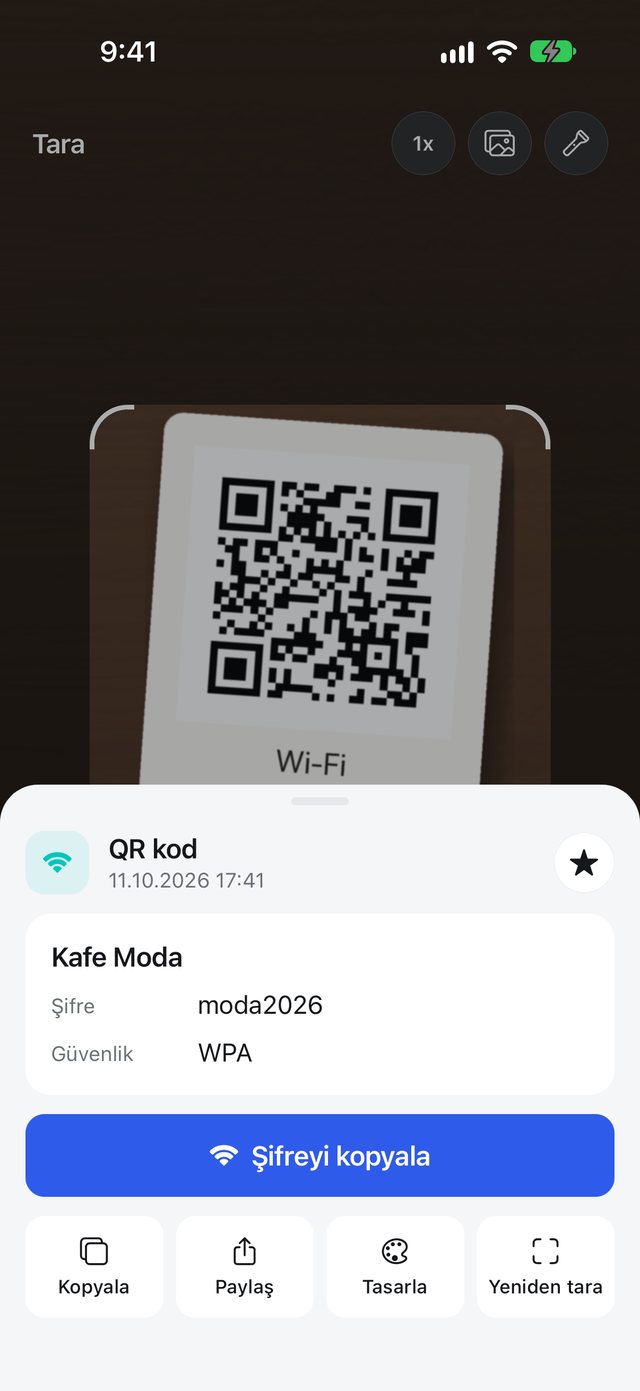
Okutmanın üç yoluThree ways to scan
Kod nerede olursa olsun okunur; içerik anlaşılır biçimde gösterilir ve doğru düğme hazır gelir. Wherever the code is, it gets read. The content is shown clearly and the right button is ready.
KameraylaWith the camera
Uygulama açılınca kamera hazır. Uzaktaki kodlar için iki parmakla yakınlaştırın, karanlıkta feneri açın, dokunarak odaklayın.The camera is ready the moment the app opens. Pinch to zoom on far-away codes, switch on the flashlight in the dark, tap to focus.
FotoğraflardanFrom your photos
Ekran görüntüsündeki ya da fotoğraftaki kodu seçin. Kod küçük, eğik ya da köşede olsa da görsel parçalara ayrılarak aranır.Pick a screenshot or photo with a code in it. Even small, tilted or off-center codes are found by searching the image piece by piece.
Paylaş menüsündenFrom the Share menu
Fotoğraflar’da bir görseli açın, Paylaş’a dokunup QR Barkod’u seçin. Kod okunur ve doğrudan Geçmiş’e kaydedilir.Open a picture in Photos, tap Share and choose QR Barkod. The code is read and saved straight to History.
- Toplu taramaBatch scanningEnvanter ya da sayım için barkodları ara vermeden okutun, listeyi CSV olarak paylaşın.Scan barcodes back to back for stocktaking and share the list as CSV.
- Doğru okumaReliable readsÜrün barkodlarında kontrol hanesi doğrulanır; yarım okunan kodlar sonuç olarak gösterilmez.Product barcodes are checked against their check digit, so half-read codes never show up as results.
- Anlaşılır sonuçReadable resultsWi-Fi kodunda ağ adı ve şifre, kartvizitte isim ve telefon, etkinlikte tarih ayrı ayrı gösterilir.Wi-Fi codes show the network and password, contact cards the name and phone, events the date.
Her şey için bir QR kodA QR code for anything
Türü seçin, bilgileri girin; doğru QR biçimini uygulama hazırlar. Kafeniz için Wi-Fi kartı, etkinliğiniz için takvim daveti, ödemeler için IBAN.Pick a type and fill in the details; the app takes care of the right QR format. A Wi-Fi card for your café, a calendar invite for your event, an IBAN for payments.
Ayrıca SMS, metin, PDF, Zoom, toplantı, Telegram, PayPal, kripto para ve uygulama mağazası bağlantıları.Plus SMS, text, PDF, Zoom, meetings, Telegram, PayPal, crypto and app store links.
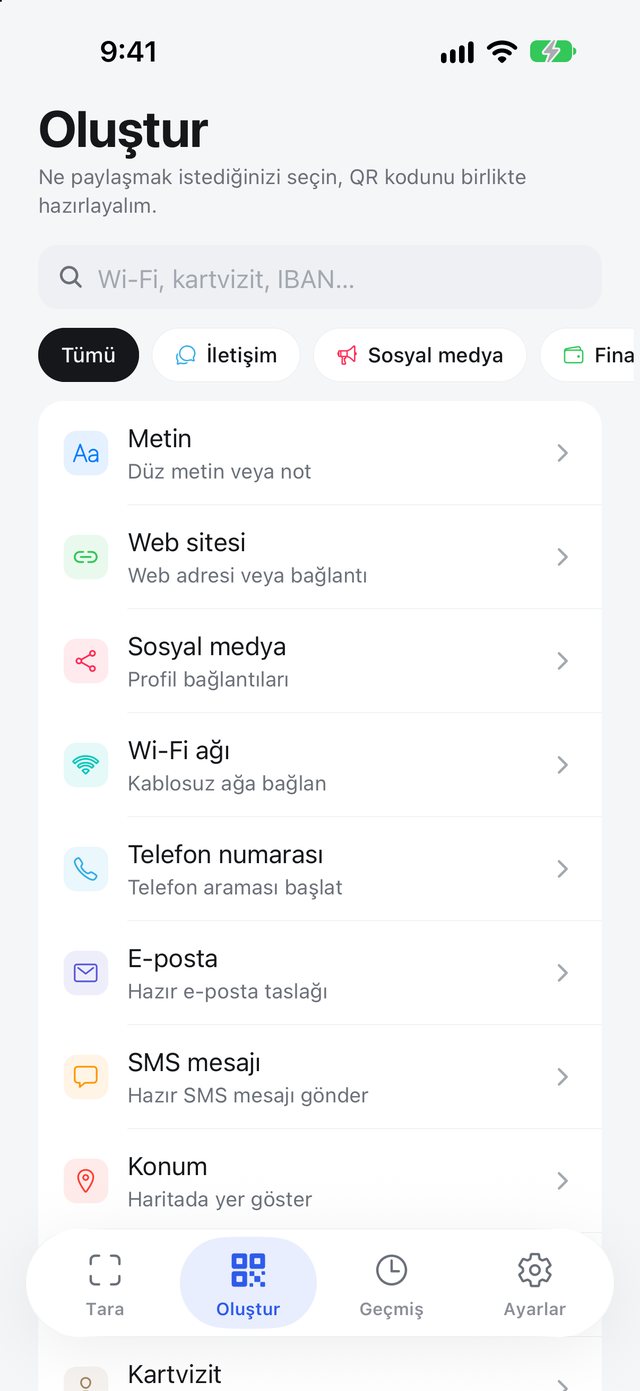
Tasarımı siz yapınMake it yours
Kod rengi, arka plan, nokta stili, ortaya logo ve altına “Menüyü görmek için okutun” gibi bir çerçeve. Hazır olunca PNG ya da JPEG olarak Fotoğraflar’a kaydedin veya paylaşın.Code color, background, dot style, a logo in the middle and a frame that says something like “Scan to see the menu”. When it’s ready, save it to Photos as PNG or JPEG, or share it.
- Okunurluk korunurStays scannableLogo eklediğinizde hata düzeltme seviyesi otomatik yükselir.Adding a logo raises the error-correction level automatically.
- Baskıya uygun oranlarPrint-ready ratiosKare, dikey ve yatay görsel oranlarıyla masa kartı ya da afişe hazır çıktı.Square, portrait and landscape ratios for table cards and posters.
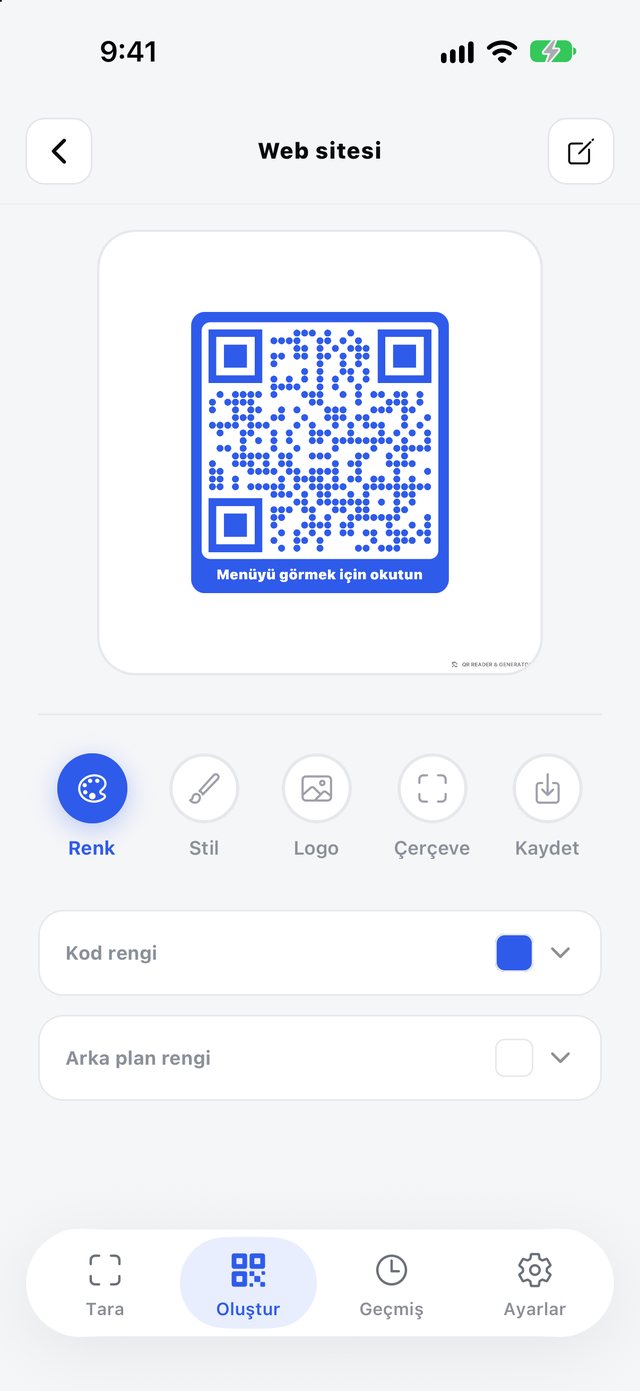
Okuttuğunuz her kod buradaEvery code you scanned, kept
Taradığınız ve oluşturduğunuz kodlar türüne göre ayrılır. Arayın, not ekleyin, yıldızlayın; istediğinizi tekrar tasarlayın ya da CSV olarak dışa aktarın.Codes you scan and create are sorted by type. Search them, add notes, star favorites, redesign any of them or export everything as CSV.
- iCloud yedeğiiCloud backupGeçmişiniz kendi iCloud hesabınızda yedeklenir; uygulamayı silip yeniden kurduğunuzda ya da yeni iPhone’a geçtiğinizde geri gelir.Your history is backed up to your own iCloud account and comes back when you reinstall the app or move to a new iPhone.
Kodlarınız sizde kalırYour codes stay yours
Okuma ve oluşturma tamamen cihazınızda yapılır. Geliştiricinin sunucusu yok; verilerinizi göremeyiz.Reading and creating happen entirely on your device. There’s no developer server, so we can’t see your data.
Hesap yokNo account
Kayıt olmadan, e-posta vermeden kullanın.Use it without signing up or giving an email.
Reklam ve takip yokNo ads, no tracking
Reklam, analiz ya da takip aracı içermez.No advertising, analytics or tracking tools inside.
Yedek sizin hesabınızdaBackup in your account
iCloud yedeği yalnızca sizin Apple hesabınızda durur; Ayarlar’dan kapatabilirsiniz.The iCloud backup lives only in your Apple account; turn it off any time in Settings.
Bir sonraki kodu hazır okutunBe ready for the next code
Ücretsiz. Türkçe ve İngilizce. iOS 16 ve üzeri.Free. Turkish and English. iOS 16 or later.
App Store’dan indirDownload on the App Store